

If you’ve been paying attention to your website traffic lately, you’ve probably noticed something… different. The way people find your business is shifting. It’s not just about a user typing a query into a search bar and clicking the third blue link anymore.
In 2026, your potential clients are having full-blown conversations with AI. They’re asking ChatGPT for the best HVAC company in the area, or prompting Perplexity to compare law firms for a complex corporate case.
For service-based companies doing $1M+ in revenue, this isn’t just a “tech trend”, it’s a major shift in how lead generation for service companies works.
The big question we keep hearing at Innerloop Media is: “How do I actually see this traffic in my reports?”
Yeah… the old way of just looking at “Organic Search” doesn’t quite cut it anymore. But here’s the good news: Google Analytics 4 (GA4) finally caught up. In May 2026, Google started rolling out a dedicated way to track these “AI Assistants.”
Let’s break down exactly how to find this data.
The “New Normal”: GA4’s Native AI Assistant Channel
Until recently, traffic from AI tools was a bit of a mess in GA4. Some of it showed up as “Referral,” some of it as “Direct,” and some of it just felt like it was coming from a black hole.
That changed with the May 2026 update. Google introduced a new default channel group specifically called AI Assistant.
How it works:
When a click comes from a recognized AI assistant, GA4 now automatically assigns it specific labels:
- Medium:
ai-assistant - Campaign:
(ai-assistant) - Channel Group:
AI Assistant
This is a massive win for measuring SEO for service based businesses. It means you can finally separate the people who found you through a conversation with Gemini from the people who found you through a traditional Google Search.
Where to find the report:
- Log into your GA4 Property.
- Navigate to Reports > Acquisition > Traffic Acquisition.
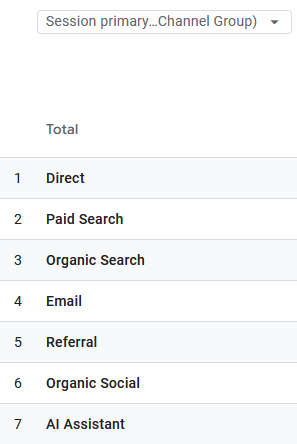
- In the table, look for the row labeled AI Assistant.
If you see traffic here, it’s a strong indication that your content is being surfaced within AI-generated responses. This natively tracks traffic from supported AI assistants such as ChatGPT, Gemini, and other recognized AI platforms. Google may expand this list over time.
Why the Default Report Isn’t Enough
Here’s the reality check: Google’s default “AI Assistant” channel is non-editable and a bit opaque. While it catches the major players, it often misses smaller but highly relevant engines like Perplexity, Microsoft Copilot (which may not always pass referral information consistently), and niche tools like You.com or Kagi.
If you rely solely on the default report, you’re likely undercounting your AI-driven leads. And for a $1M+ business, undercounting your success is just as dangerous as overcounting it. You need to know exactly which digital marketing for service businesses are actually moving the needle.
There are ways to create Custom Channel Groups, but by the time we finish explaining and documenting it, it’ll probably be out of date!
One tip is to change the view in your Traffic acquisition report to show source / medium: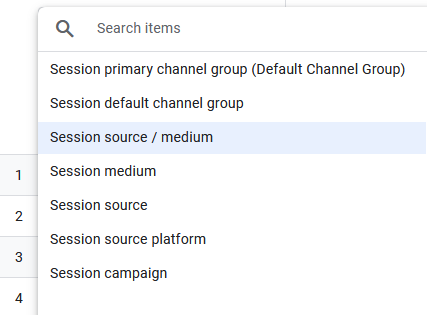
Then you’ll see what is flowing into the ai-assistant grouping and what is not: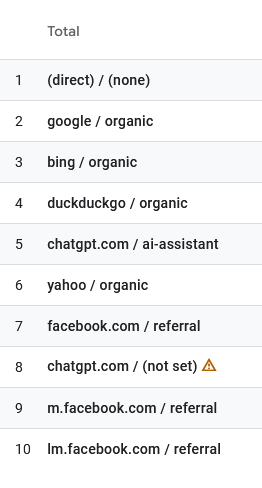
The “Dark Traffic” Problem: What You Still Can’t See
Before you get too excited about your new dashboard, let’s have a call to reality.
About 30-40% of AI traffic is still invisible.
Why? Because of how native mobile apps work. If a user is on the ChatGPT app on their iPhone and clicks a link to your website, that app often “strips” the referrer data. When that user lands on your site, GA4 sees no source information at all.
Where does it go? It falls into the Direct channel.
So, if you see a sudden spike in “Direct” traffic that correlates with your AI-optimized content efforts, there’s a high probability that it’s actually AI traffic in disguise.
Yeah… it’s not perfect. But it’s the reality of modern digital marketing for $1M+ businesses. You have to look at the trends, not just the raw numbers.
Don’t Forget Google Search Console (GSC)
While GA4 tells you about clicks that landed on your site, Google Search Console is where you see AI Overviews (SGE).
Google’s AI Overviews are different from “AI Assistants.” These are the AI-generated summaries that appear directly at the top of a standard Google Search. They’re a big part of zero-click search, where people get their answer without ever visiting your site.
Google Search Console doesn’t yet provide complete reporting for AI Overviews on every property. In most accounts, clicks from AI Overviews are included in your standard Web Search performance rather than separated into their own report. Google continues expanding AI reporting, so keep an eye on Search Console as new reporting features become available.
If your account supports it, try looking here first:
- Open Google Search Console.
- Go to Performance > Search Results.
- Click the + New filter and select Search Appearance.
- Look for AI Overviews.
As of this writing, it’s not likely that you will see this data in your account. We’re hoping this article ages well and it will be a great resource for you when Google rolls the functionality out more broadly.
Human Oversight vs. Automated Shortcuts
It’s tempting to look at these AI marketing tools as a “set it and forget it” strategy. But the businesses winning in 2026 aren’t the ones just dumping AI-generated content onto their blogs and hoping for the best. They are the ones using AI to understand what their customers are asking, then creating high-value, expert-led content that AI wants to recommend.
Frequently Asked Questions About Tracking AI Traffic in GA4
To help you refine your measurement strategy and get complete visibility into your analytics, here are answers to the most common questions about tracking AI search performance in Google Analytics 4:
Does GA4 automatically track ChatGPT and AI search traffic?
By default, GA4 groups some web-based AI tools under standard referral traffic. However, standalone desktop or mobile AI apps frequently strip referrer headers, causing visits to fall under “Direct” or “Unassigned” data unless you create custom channel definitions.
Why is my AI search traffic showing up as “Direct” in GA4?
When AI platforms (like ChatGPT, Claude, or Perplexity) link to external websites, application and browser privacy protocols often remove the referrer source. Conducting a comprehensive SEO audit to cross-reference GA4 landing page spikes with Google Search Console impression trends helps uncover this “dark traffic”.
How often should I check Google Search Console for AI search queries?
Reviewing Search Console weekly under Performance > Queries helps you catch emerging conversational search trends, identify pages with high impressions but zero clicks, and optimize your titles before visibility drops.
As we often say at Innerloop Media: The power is in the strategy, not just the prompts.
Quick Action Steps for This Week:
- Audit your GA4: Check if you have the “AI Assistant” channel appearing in your Traffic Acquisition report.
- Check GSC: See if you’re appearing in AI Overviews for your core services.
- Adjust your content: If you aren’t seeing AI traffic, your content might be too generic. AI looks for “Entity Signals”: specific, expert-level information that identifies you as an authority in your field.
Does your current data show you’re winning the AI search game, or are you still invisible?
If you’re a $1M+ service business and you’re tired of guessing where your next lead is coming from, let’s talk. We specialize in taking the guesswork out of digital marketing for service businesses so you can focus on running your company.